 Quick view
Vendor: PlanoNest
Bi Weekly Money Manager Spreadsheet Excel | PlanoraNest Template$1.00
4.7 / 5.0 (3) total reviews
Vendor: PlanoNest
$1.00
Excel
Quick sign in at checkout — your templates are saved to your library forever.
Related picks
Explore other digital products that pair well with this template.
Quick viewVendor: PlanoNest
Bi Weekly Money Manager Spreadsheet Excel | PlanoraNest Template$1.00
 Quick view
Vendor: PlanoNest
Equity Line Of Credit Calculator Spreadsheet Excel Template | PlanoraNest Template$1.00
 Quick view
 Quick view
Vendor: PlanoNest
Couples Budget Spreadsheet For Joint Savings Excel Template | PlanoraNest Template$1.00
This Excel stock portfolio tracker template from PlanoraNest is a personal investment tracking spreadsheet with live Google Sheets price integration, gain/loss calculations, and historical performance charts. Six sheets with GOOGLEFINANCE-powered live quotes and automated CAGR returns. One-time purchase at $1 (compare at $1), instant download, no subscription.
This stock portfolio tracker is built for individual investors who want to monitor their holdings without a brokerage dashboard:
Six sheets covering live quotes, portfolio tracking, and historical analysis:
Quick-start guide with navigation tips and setup instructions. Includes the PlanoraNest link for more templates and updates.
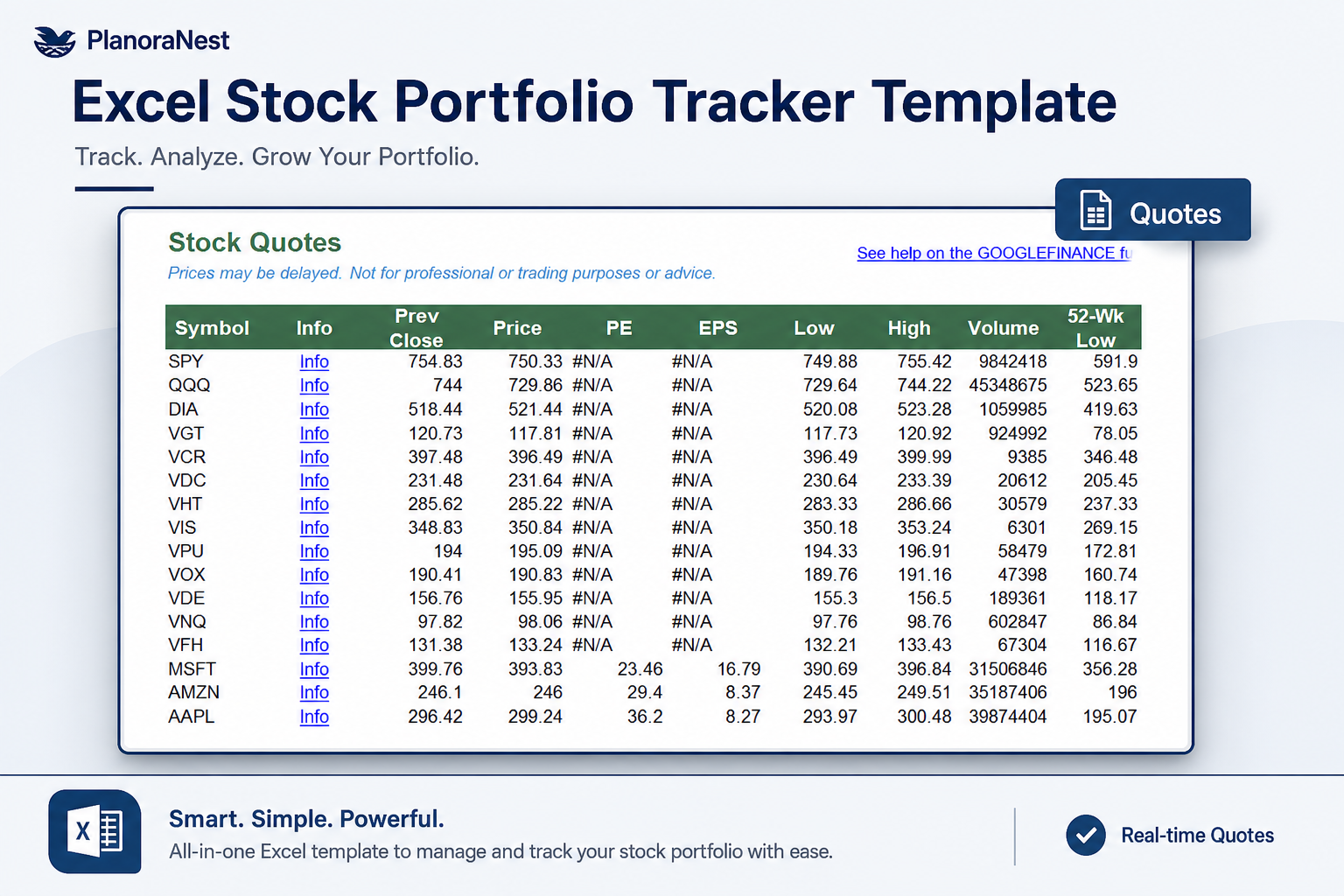
Live stock price dashboard with 11 columns per ticker: Symbol, Info, Prev Close, Price, PE, EPS, Low, High, Volume, 52-Wk Low, and 52-Wk High. Each row uses the GOOGLEFINANCE function wrapped in IFERROR to pull live or near-real-time data from Google Finance. The Info column is a clickable hyperlink to the stock's detail page. Add any symbol (stocks, ETFs, mutual funds) to column A and copy the formulas down. Includes sample data for SPY, QQQ, DIA, VGT, and VCR.
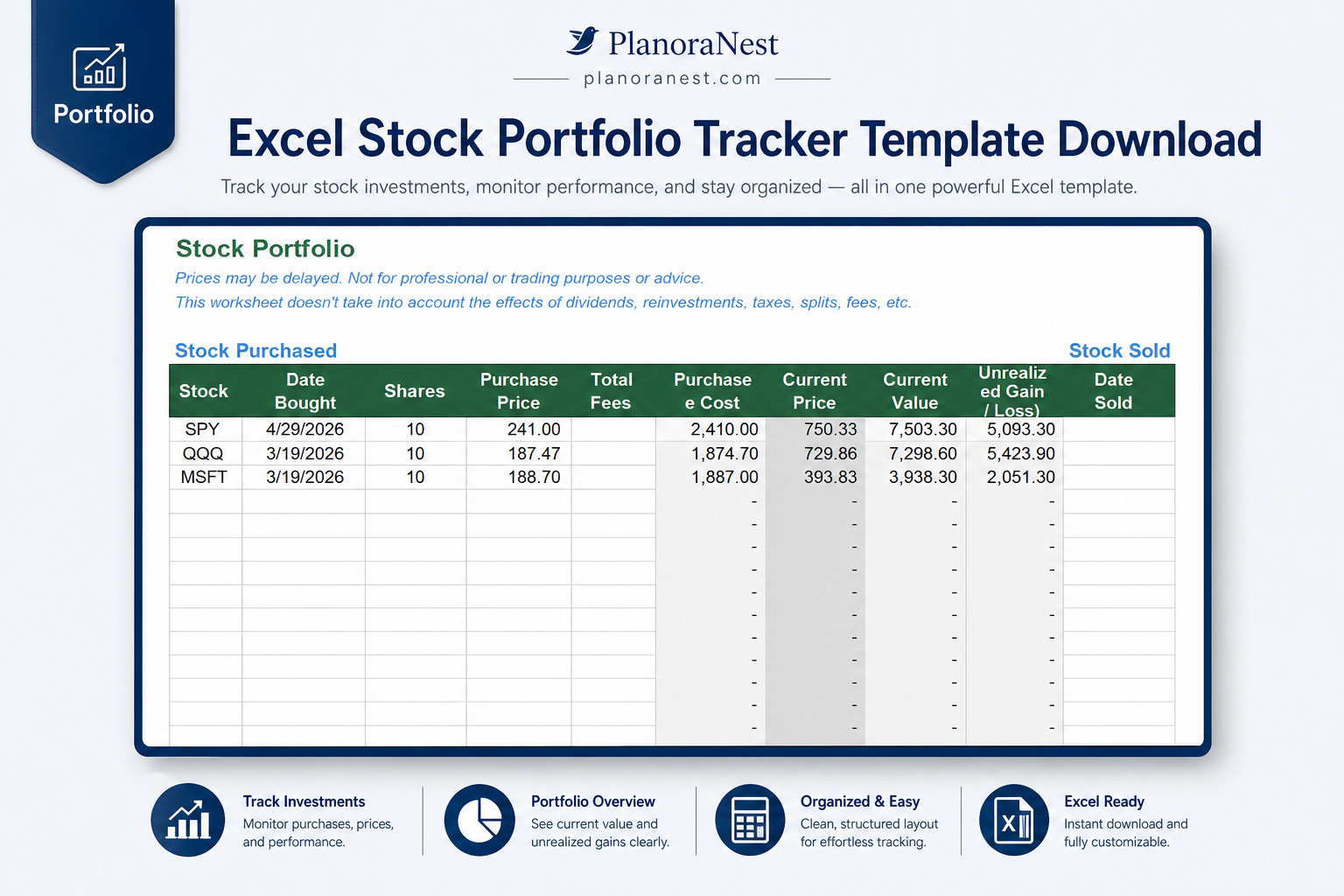
Your holdings tracker with 14 columns split into Purchased and Sold sections. Stock Purchased: Stock, Date Bought, Shares, Purchase Price, Total Fees, Purchase Cost (Shares x Price + Fees), Current Price (GOOGLEFINANCE), Current Value (Current Price x Shares), Unrealized Gain/Loss (Current Value - Purchase Cost). Stock Sold: Date Sold, Sell Price, Income from Sale (Sell Price x Shares), Realized Gain/Loss (Income - Purchase Cost). CAGR (Compound Annual Growth Rate) calculates automatically for each holding using the formula: (Current Value / Purchase Cost)^(365/days held) - 1, using TODAY() for open positions. Tracks buy-and-hold positions as well as fully exited trades.
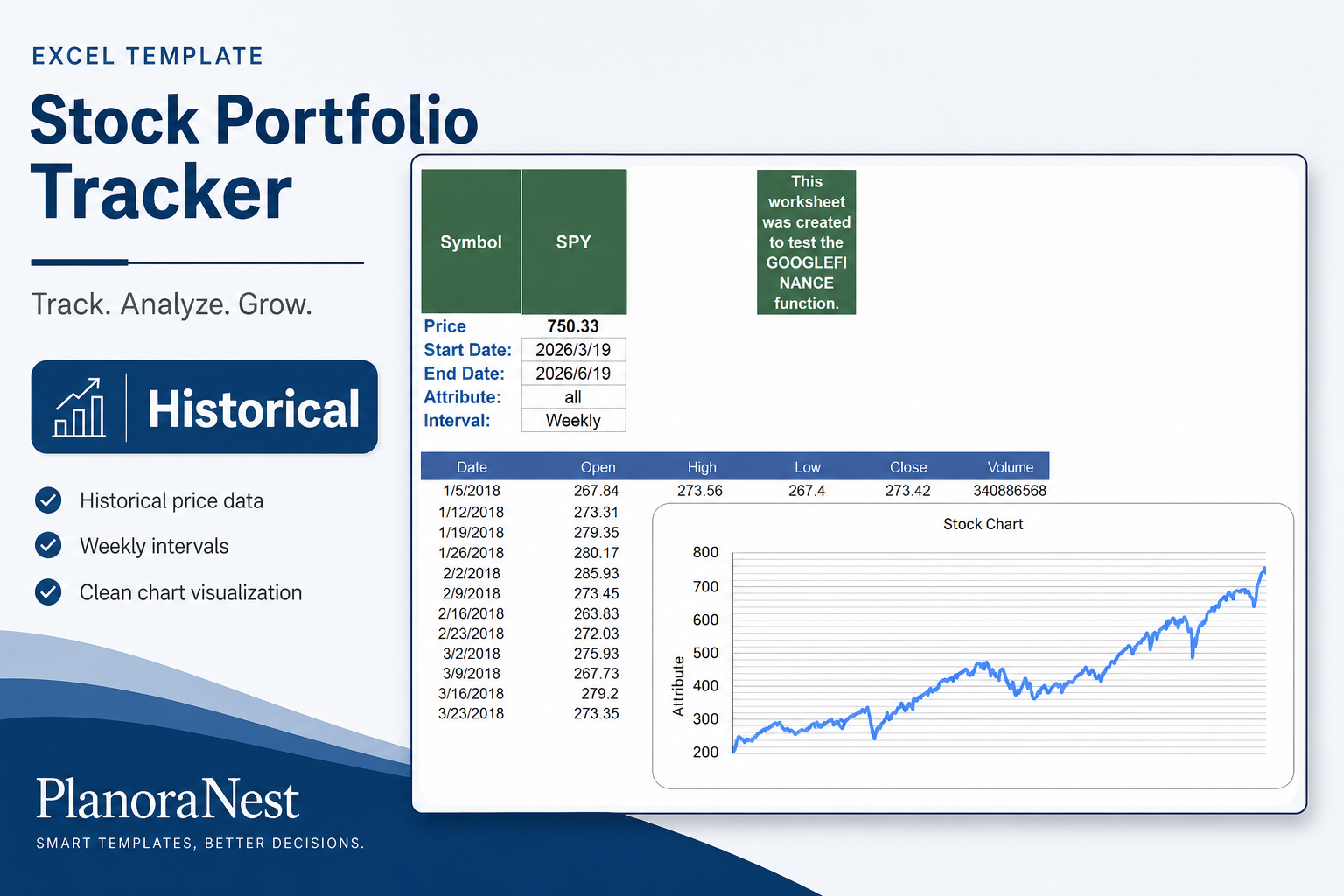
Historical price data engine with 1,200+ rows. Configure a Symbol, Start Date, End Date, Attribute (price, all), and Interval (Daily, Weekly). The sheet pulls historical open, high, low, close, and volume data via GOOGLEFINANCE. Use this for chart-ready data, performance analysis, and backtesting. Sample data shows SPY weekly prices dating back to 2018.
Documentation covering template overview, how to add more stock quotes (enter symbol in column A, copy formulas), GOOGLEFINANCE function guidance, and links to related financial templates (Simple Investment Tracker, Financial Calculators, Budget Templates).
Template credits, license information (personal and commercial use allowed, no resale), and usage notes — designed for personal and business productivity.
| Sheet | What it does |
|---|---|
| Start Here | Quick-start guide for portfolio tracking setup |
| Quotes | Live price dashboard: Symbol, Price, PE, EPS, High/Low, Volume, 52-Week Range via GOOGLEFINANCE |
| Portfolio | Holdings tracker: Purchase Cost, Current Value, Unrealized/Realized Gain-Loss, CAGR with TODAY() |
| Historical | 1,200+ rows of price history (Date, Open, High, Low, Close, Volume) via GOOGLEFINANCE |
| Help | Documentation and links to related financial templates |
| About | Credits and license terms |
See how each sheet looks before you download — screenshots from the actual template.
Preview of Excel Stock Portfolio Tracker Template Download | PlanoraNest Template
Preview of Excel Stock Portfolio Tracker Template Download | PlanoraNest Template
Preview of Excel Stock Portfolio Tracker Template Download | PlanoraNest Template
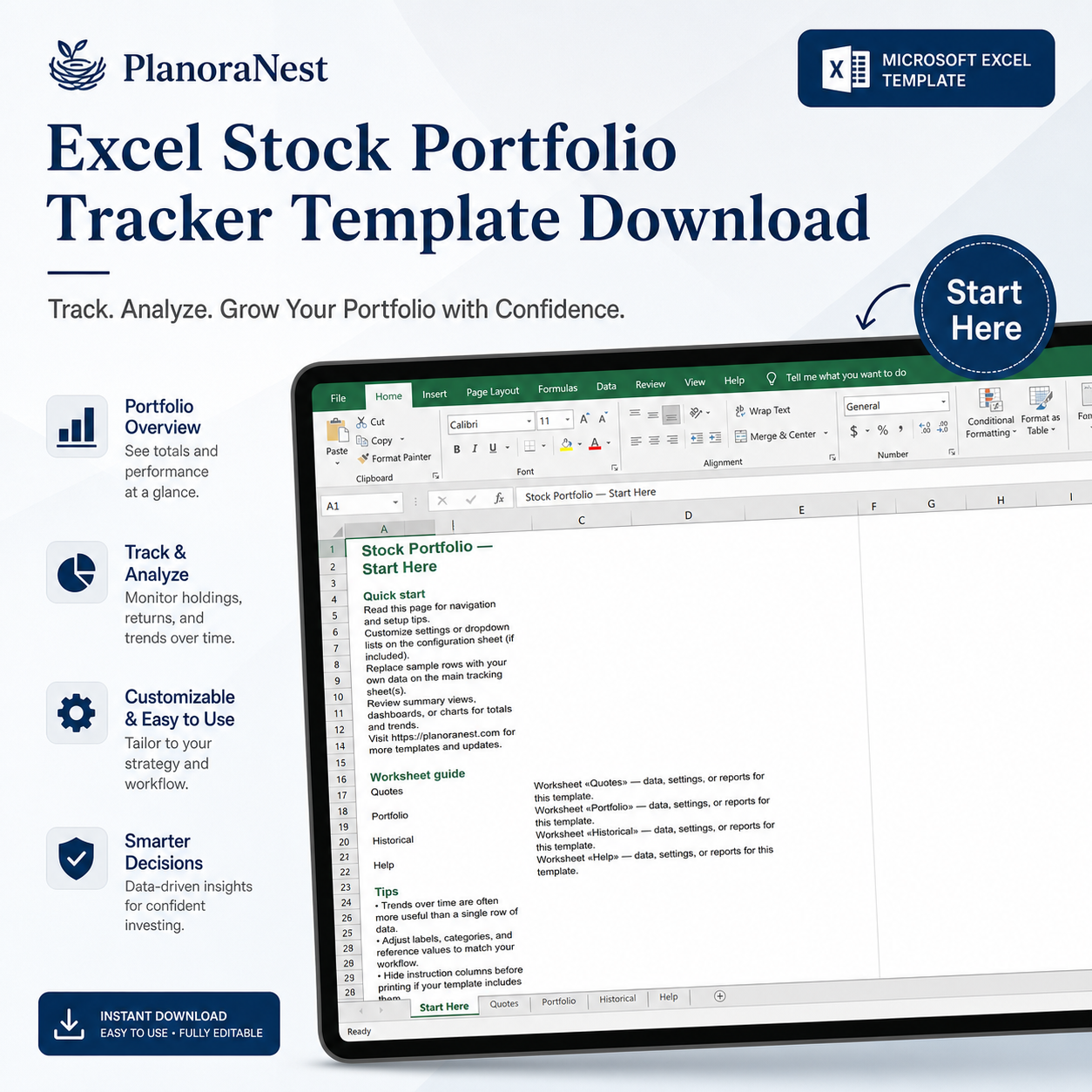
Preview of Excel Stock Portfolio Tracker Template Download | PlanoraNest Template
Get your stock portfolio tracker running with live data in under 15 minutes:
One-time purchase — $1 USD (compare at $1) — Instant download — No account required to use the file after purchase.
1. Purchase
Browse our shop and pick the templates that fit your needs — from business planners to productivity trackers.
2. Access
Since our products are digital, you'll receive immediate access after your purchase completes.
3. Use
Open your template in Google Sheets, Excel, or Notion and start using it right away with our included instructions.
Priya Nair
Financial analyst
Verified purchaseClean portfolio tracker, good formulas
I track 25+ positions across two brokerage accounts and this template pulls everything together nicely. The CAGR formula is correctly implemented — handles both open and closed positions. GOOGLEFINANCE integration on the Quotes sheet is seamless in Google Sheets. One suggestion: add a dividend tracking section, but for pure price-and-return tracking this does exactly what I need.
Tom Reyes
Office manager
Verified purchaseGreat for learning how portfolio math works
I'm new to investing and bought this to understand how gain/loss and CAGR are actually calculated. The formulas aren't hidden — you can click on any cell and see the math, which is exactly what I wanted. Added my 7 ETF holdings and the Unrealized Gain column updates whenever I open it in Google Sheets.
Chris Mueller
Independent contractor
Verified purchaseReplaced my brokerage's limited tracking
My brokerage only shows cost basis for positions held with them. I have stocks across three accounts plus an old 401(k), and this template gives me one view of everything. The Historical sheet with 1,200+ rows of weekly SPY data is a nice bonus — I use it to compare my individual stock returns against the index.